Category Archives: Power Platform

M365 Twin Cities Logo

M365 Twin Cities – Conference Event

M365 Twin Cities is the evolution of SharePoint Saturday Twin Cities and is a Community Days event. As a part of Community Days, we’re also aligned with MGCI – Microsoft’s Global Community Initiative.

We cover topics from M365, Copilot, Power Platform and anything related or adjacent to M365 like Azure, governance, security, and a lot more. Our audience also falls across many personas: Users, decision makers, power users, makers, developers, administrators, and others.

As we’re currently preparing for our 2026 event, let’s recap our 2025 event a bit.

2025 Event By the Numbers

Our 2025 event was on Friday September 19, 2025. We had 705 registrations prior to the event with a number of folks that registered at the event. All in all, we had about 380 folks on site (that’s a pretty normal ratio against registrations). The attendee numbers were a good trend from 2024 where we had about 250 folks – steadily growing post-pandemic.

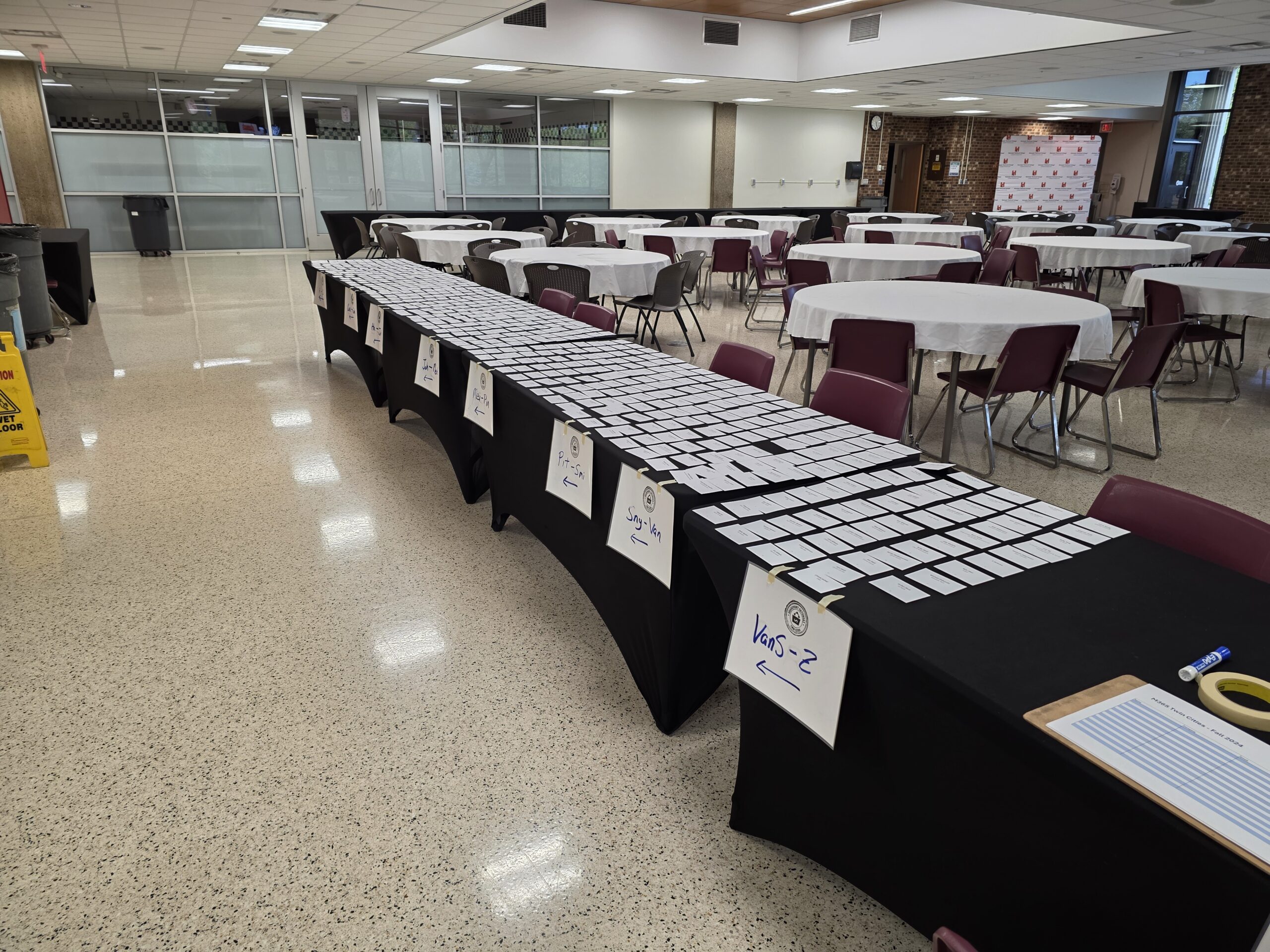
Registration – Ready to go!

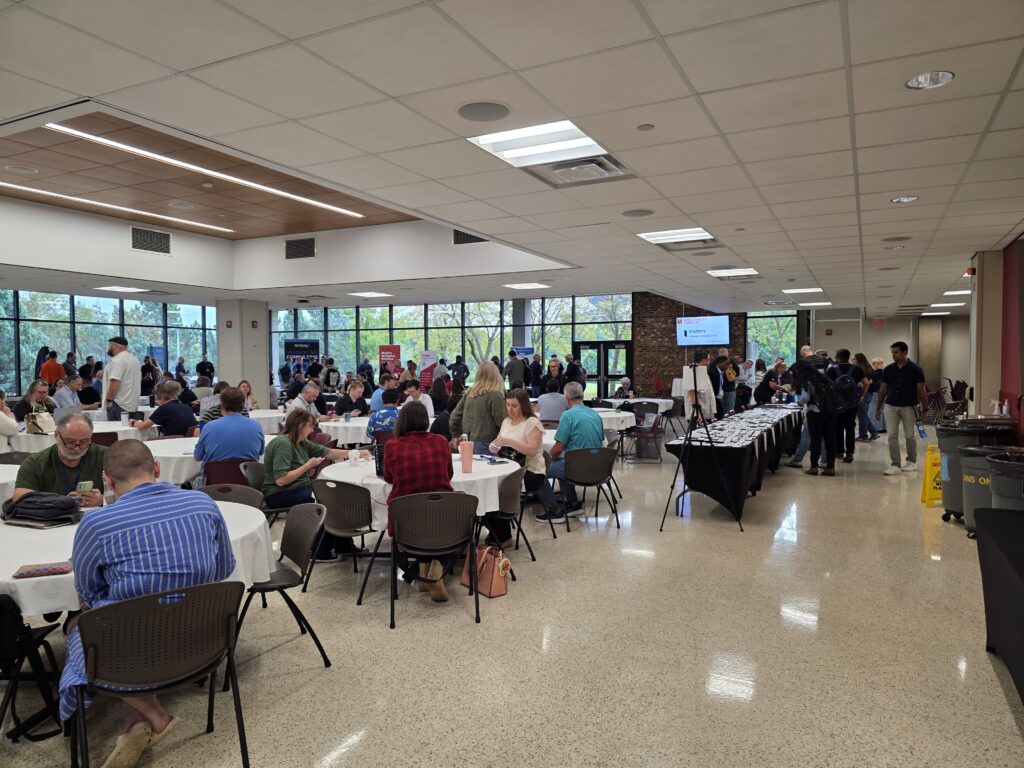
The ‘vibe’ was overwhelmingly positive. The higher attendance was immediately obvious and contributed to the higher energy in the room from both attendees and sponsors. As our community usually does, they hit up the sponsors early – even before our opening info session. The coffee and donuts may have helped as well.

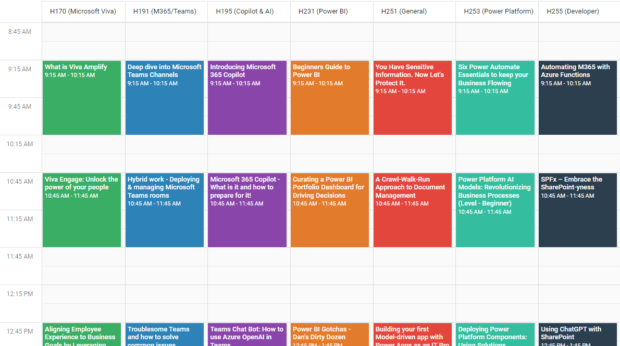
We had 31 sessions with 33 speakers across 8 rooms – with the largest session attendance topping out around 110 people! Learning was had by all.

Sponsorships post-pandemic were, and still are, a challenge. The market has changed, the economy has changed, and how sponsors engage with customers has changed. Where we had a little budgetary buffer in the past (pre-pandemic), events are tough to fully fund. We’re hopeful that rising attendee numbers will help bring sponsors back. Our 2025 event had 8 wonderful and fully engaged sponsors.

Locally, we’ve got a really strong Microsoft community – a healthy SharePoint history and M365 adoption across businesses, government, and other organizations. While this is mostly a good thing, it also drives a bit of competition with other groups and events within our community. While this is great for attendees, it’s tough on sponsors and event producers. There’s only so much funding to go around and tight budgets can impact community-driven (and funded) events like ours.

Historically we’ve had 1-2 events a year with 2 events most years. Coming back post-pandemic we’ve tended towards a single event – *and* moved to Fridays – in an effort to make sponsorship funding more reasonable for our supporting vendors.

Next up – Fall Event

Our 2026 event will be held on Friday September 18, 2026. Registration is open. We’re working on session selection and aim to have the schedule up in a few weeks.

Speaker and session selection for an M365 community event.

M365 Twin Cities – Session Selection

Uffda. This is the recurring (now annual) “picking sessions and speakers for an event is hard” post.

How it starts

  • 32 session slots available (8 rooms, 4 time slots)
    • Of these, we reserve 4 for potential sponsored sessions. These may be freed up for other content as we get closer to the event if we don’t find sponsors to fill them.
    • This leaves 28 session slots for community speaker sessions
    • NOTE: We’ve had more rooms in the past, but this tends to dilute attendance per session. Fewer rooms tend to raise the number of attendees per session which is nice for presenters. Like anything this is a variable we tweak and adjust as we don’t want rooms too crowded either.
  • 109 sessions submitted from 53 speakers
    • Yes – a LOT of Copilot/AI topics this time around. We’ll have plenty but there’s still lots of other relevant topics to talk about.
    • We had a notable jump in new speakers submitting – mostly out of town folks that we don’t know personally. I’m curious what drove that… We didn’t change anything that I’m aware of when it comes to Call for Speakers or communications. Interesting.
    • As with every event, we also had a number of “regulars” – friends and colleagues – that didn’t submit, which is disappointing. They each have their reasons. When it’s our fault with scheduling it hurts a bit, but we do our best – scheduling is also tough. It’s a bummer to miss opportunities to host and hang out with friends we’ve made in the community.

Our community is blessed with so many folks full of ideas, with wide varieties of experiences, and with the willingness and skills to share their knowledge with others.

Now, expectation setting… We never get this 100% correct for everyone. We guess who’s going to attend and what they want to hear. We base our decisions on previous events, on what we know about the technology, the topics, the speakers, past attendees, and all sorts of input. But we do our best to balance what we can.

Our panel consists of members of the leadership team. Your event and approach may vary. I’m sure there are other variations and ways to do this – maybe put together a content committee or something along those lines. We tend towards simplicity, so here we are.

Priorities, Variables, and Factors… How it comes together

There are a bunch of things we work towards balancing. We want to invite out-of-town speakers, but we like to favor local folks where we can as well. We want to give new speakers an opportunity to speak while also providing known quality speakers for attendees. Because of these priorities we don’t use the blind selection method (looking at titles and abstracts while hiding speaker names).

We leverage our event tool Sessionize where and how we can, sometimes using their selection/rating system and process, sometimes we tweak the methods. The tool does a wonderful job of collecting submissions and later notifying folks once decisions are made.

When it comes to topics, we try to find a variety of timely and relevant topics that apply to our attendee base. We’ll compare similar looking sessions. We’ll look for sessions that appeal to different roles in the M365 world, different products, etc.

Once we get the number of prospect sessions down to around the number we need, we switch gears and start looking at how those sessions fit into slots in the schedule. If we have too few or too many sessions around a topic or what might turn into a topic “track” then we start to massage the schedule to work as well as we can.

Our event doesn’t usually have a keynote. We’ve got a room for it now (we didn’t for a number of years) but attendees seem to prefer filling the time with as many sessions as possible. Better to have 8 topics to choose from for one of the time slots rather than just one and hope it appeals to most.

Finally, we slot the sessions and review the schedule for topic conflicts, overlaps, if speakers have more than one session (not many) they aren’t scheduled at the same time, etc.

Setting the schedule

We whittled the list down to 29 sessions (1 sponsor and 28 community sessions) with a number of backup sessions from the queue of speakers.

We have 33 speakers – a few sessions include more than one presenter. This means we have to turn down 20 folks. This is one of the hardest parts of the process. So many folks that took some of their valuable time to create sessions, write abstracts, and come up with titles. We don’t have room for them all to present, but we are thankful for them and hope they submit again.

Thoughts…

The concept of a content panel is interesting. It might be something to look at if attendee numbers continue to rise. We could also do some more polling of attendees to see what topics folks are interested to either verify our assumptions or give us more data to work with.

We get a step closer to the event

Visualize the comparison or battle between Microsoft's Power Platform and Pro-dev coded customization

Power Apps … *One* Option for Extending M365

This note is in response to Andrew Connell and Julie Turner’s YouTube video – “Ep. 009 | Microsoft 365 Extensibility: Power Platform isn’t the Only Option” – on their “Code. Deploy. Go Live.” YouTube channel.

The premise of their episode title and some of the take-aways that struck Andrew and Julie were:

  • “Power Platform is still king” – Julie’s observation while working the Ask the Experts table/panel and seeing the line – the demand – for Power Platform Q&A.
  • “The number of people that think that the way to build something custom on M365 – that your only option is Power Platform.” – Andrew’s observation after Seattle’s TechCon event.

I don’t necessarily disagree with these observations. Many folks that have dug into the Power Platform are invested… Power Apps and Power Automate have become their “hammer”, their tools of choice, their platform of preference and bias – both the community and marketing Microsoft has built around these tools does little to discourage that thinking.

Awareness

I don’t know if folks aren’t aware of other methods to customize M365, or if they simply aren’t driven to find or investigate other options. For many of these folks – folks in the Power Platform’s target audience – “development”, “pro-code”, etc. is a no-go. Many are business users that have little interest in becoming developers and shy away from conversations about actual coding.

As for me, while I focus on a range between out-of-box capabilities for power users of M365 through Power Apps makers, I try to include the full range of options available for folks in the conversation: from out of box capabilities, to tools like Power Platform that extend traditional platform capabilities, to pro-dev customizations. 3rd party products also figure in the mix and also change at a rate challenging to keep up with.

Power Platform is accessible

I’m not sure “accessible” is the right word… but for many M365 users the step up to Power Apps and Power Automate is a lot more approachable, achievable, reachable, and viable than stepping into the “pro-dev” development world. Mostly from a skills perspective. They can start experimenting with *some* Power Apps and Flows with very little effort and see results. Now, I understand that getting bigger results with Power Platform requires an investment of time and effort to do more advanced things. If someone were to compare efforts at becoming a high-level Power App maker with the effort to become an effective pro-developer resource… I’m not sure what that might look like. I am confident that most Power Apps folks would still choose Power Apps. Digging into the reasons for that would be interesting…

For a lot of folks, there’s a bit of disillusionment with IT and development. Developers are almost always overworked and have huge backlogs of work (new or maintenance) to keep them busy – making new requests hard to deliver on a timely basis. With that, lots of folks see opportunity with Power Apps as a way to get what they need from a business standpoint more quickly and easily.

Yes, those of us on the IT side know choosing that path comes with a price. But folks trying to get their jobs done will still do it and deal with the “other stuff” later. Often with the blessing of their (non-IT) managers.

Some organizations don’t have developers available in-house, so they need to engage with consultants – which cost money. These (usually) small to medium (“SMB”) organizations often resort to seeing how much they can get done with the tools and licensing they have available – which leads them to the Power Platform.

“Not Enterprise-Ready”

Most of the folks I work with are at the intro-level of Power Apps, where I’m making folks aware of what’s available within existing M365 licensing. While I’ve seen some larger implementations, I don’t (IMO) have enough experience there to say where the Power Platform may falter in enterprise-level implementations – specifically when it comes to the limitations of the platforms.

What I do know is that there is plenty of room for error in governance – both in planning and implementation. Most every pro-dev shop will enforce some level of application lifecycle management – or “ALM”. In short, this means they develop in an environment separate from the production data and functionality. While there are ways to implement ALM features with the Power Platform, it would be interesting to see stats on how many orgs that use Power Apps and flows are implementing ALM. Without ALM, they’re introducing risk to their environments. Risk to data. Risk to processes that can grow into business-critical levels. And more.

There are more Power Platform for M365 is “not ready” topics, but ALM is one of them.
I’d quickly add data to that list… where you choose to manage your data is important as solutions grow. Microsoft Lists and SharePoint Lists (the same thing) are wonderful tools for business users but have limitations and cede to Dataverse or SQL as they need to scale over time.

Final Thoughts… for now

*Some* of the perceptions above are biased by the conference’s target audience. I think we’ve been seeing fewer Developer attendees and more Power Platform folks.

Power Apps have their place in the maker/development/customization space. What role it plays, where triggers exist for review, migration, or other will vary from organization to organization. In an ideal world Power Platform tools are introduced to an environment in partnership with Pro-devs. ALM for Power Apps and flows are modeled on Pro-dev processes, and more.

I think Power Apps are a great way to extend List functionality – both with forms and data presentation.

I think it’d be great to see some Pro-Dev comparisons to each of the tools in the Power Platform space. Come up with some common scenarios where Power Apps, Flows, BI or other are implemented and discuss the efforts and capabilities of either approach…

It’s also important to get the “there are multiple approaches to customizations” conversation to decision makers – often the folks NOT at conferences. (generalization, not the rule…)

There are a lot of threads here that could be pulled… Lots to talk about. And lots of “it depends”. 🙂

… and we haven’t even touched how/where the D365 community differs from the M365 community and Power Platform’s piece of that conversation…

Tech Conferences – Also for End Users

Maybe it’s me, but it seems that there aren’t enough end users at technical conferences. There are a variety of tech events out there and some of them are absolutely deeper dives for technical professionals. But there are more – either professionally produced or community-run – that include content for everyone.

Now, I could have said “training” instead of “conferences”, but training is more obvious (everyone needs it, including end users) and often covered by training departments within larger organizations. The conferences part here is also important because it involves networking with peers – usually outside of the organization. People with different perspectives and company cultures that can bring new ideas and approaches to common issues. Conferences are also great opportunities to interact with SMEs – either community contributors or the folks building the products.

Obviously, you can’t stop work and send everyone. But you can often send more than we’re currently seeing – especially free local events. These events aren’t just for IT. Ultimately, having end users in attendance can also help IT by bringing a business perspective to product features. And yes, these product feature conversations do still need to be tempered by IT realities: cost, time, risk, and many more…

We’ve always had end users at conferences, but never enough when you consider where and how the impact on business occurs and just how many users there are out there. The impact they make isn’t isolated though. It requires partnerships within each org. Users aren’t going to be successful if the platform isn’t deployed or configured correctly (IT Pros). Users aren’t going to be successful if platform owners don’t make connections between tech and business priorities, train users, and keep them up to speed.

Engaging technology to further the business requires awareness, skills, and a bit of balance between a number of teams. The benefits can be awesome.

End users are challenged by awareness, instruction, divided priorities, and limited time. We can group these a bit. Priorities and time go together as there’s often not enough time (this continues to get worse as organizations keep trying to get lean…) and business, not tools, are (and should be) the priority. Learning tools is secondary even if the end result makes the business more efficient.

Awareness and instruction go together with the awareness part often overlooked (also another topic…). Users need to get a grasp of what tools or capabilities are available (awareness) and then learn how to use them (instruction) when they’re relevant. In an ideal situation someone like a platform team or a customer success team may cover awareness in terms of what features are available and where they fit – translating between the tool and business needs. In many cases, however, IT can be a blocker of sorts… not letting users know features are available, or even disabling them.

Disabling features can very well be for legit reasons (security, conflicts with capability offered by other products, etc.). In some cases, they might not enable features until they’ve been tested and validated, IT trains up on them, or training materials are created. And again, we run into crunch time with IT not having enough time to dig in. If end users learn themselves about features, they can inquire about them with IT and help determine when it might be a business priority to deploy features and capabilities. It’s for each organization to find the balance that works for them between business needs, IT capabilities, and prioritizing them.

More than ever before (at least that I’ve seen) the makers of apps, tools, and services are reaching out directly to end users instead of relying on IT as an intermediary. They’re both building tools that appeal to end users and marketing directly to them. Microsoft Lists, for example, has been around for over 20 years (SharePoint, then Microsoft Lists) and is aimed at end users to manage information with structure. More recently the Microsoft Power Platform targeted all users with Power Automate and Power Apps – though I’d argue Power Apps is very much NOT for all users… but that’s another post. Currently, we’re in the midst of AI and Copilot rollouts that will have impact on everyone.

Summary

The more end users we can get at conferences, in training, and engaging within technical communities, the better. They can gain awareness to features and capabilities to understand where and when they might be useful in their business needs. They’ll know when to ask IT to turn a feature on they might not have access to initially. They can build personal networks and provide valuable feedback to product owners.

So, especially when it comes to local and free (or for marginal costs…) events, make the time when you are able to enable your employees and your teams to join the conversation! It’s good for mental health to step away from the grind every so often too. 🙂

Context and Perspective

My opinion and experience here is biased on several accounts:

  • I’m an event producer. Just small, local, community-run events, but still. I’m interested in getting folks to events both because I want events to be successful and because I want folks to have the opportunity to learn, to skill up, to become more effective with the tools they use (that’s why we put them on after all…).
  • I’m also involved with a group that promotes community events and encourages folks to produce them.
  • The tech spaces I work in (Microsoft M365, SharePoint, Lists, Teams, Power Apps, etc.) have historically been near the “edge” of where tech professionals, power users, and end users come together.
  • I speak at a variety of events – both community-run and larger commercial events.

References

  • M365 Twin Cities – Next one on Sept. 6, 2024 – The event I put on with a team of awesome folks
  • MGCI (Microsoft Global Community Initiative) – The organization I am associated with as a Regional Leader to
  • Community Days – Community-run events (Primarily. Others are listed as well) associated with MGCI’s efforts..
  • TechCon 365 – A larger professionally run event that typically produces 3 or so events per year across the US. A week-long event with workshops, keynotes, and sessions.
    If you’re interested in these, let me know as I often have discount codes available.
white printer paper

Delivering More Usable Power Apps

When folks start digging in with Power Apps (at least in my experience) they want to accomplish something business-related – trying to add functionality that was missing in their daily activity, their processes, their interactions with others, etc. Power Apps is great at that.

What early Power Apps makers (non-IT) don’t usually consider at first is branding, design, or accessibility. They build something that makes sense for them alone. The scope is one person or one team – which is completely fine – rather than a wider organizational view. For many projects that might be the end of it: “Boom, it works. Process improved”.

In some cases, those relatively small, “home-grown”, simple solutions gain a broader adoption (it gets more popular than originally intended…) – which can bring with it additional considerations… One of those “now more important” topics is UX/design.

As the size and capabilities of an organization increase, app makers often have more policies to follow and resources available. Branding standards and corporate color templates seem to be the first elements that get added. Designers are part the mix. As more resources become available within the org, there can be a variety of UX/design roles that include researchers, designers, and more. These folks can bring creativity and experience to the table that notably improve the look, feel, and functionality of apps.

If they are available in your organization, learn what resources are available and when to get these folks involved.

Investments in design and UX can potentially yield solutions with higher usability and user adoption rates. The same usability goals and techniques that apply to Power Apps also work with other apps and interfaces – this includes custom development as well as dashboards and cards in Teams and Power BI…

In an organization with established development ecosystem, processes and standards are likely being leveraged. Folks know what teams and resources are available. The quickly growing non-IT Power Platform maker population however might not be aware of these resources if they’re not looped-in with the established development org.
As a Power Apps enabled organization, strive to:

  • Learn the differences between the roles: UX, UI, designers (and others)
  • Understand the value UX folks bring to app development
  • Learn when to engage, how to best engage, and what to expect when engaging UX folks

With the popularity of Microsoft’s Power Platform and Power Apps, we’ve added lots of new folks to the maker community. These makers have new (or new to them) tools that enable them to build impactful business solutions but usually don’t have experience satisfying user experience needs of their users. The more you can integrate the UX expertise that’s available out there, the better the organization will be served by these dynamic app-generating efforts.

Note: This quick post was intended to make PA folks aware of UX resources… It’s a far cry from digging in to all the details, benefits, nuances, etc. that you’ll run into if you have the opportunity to work with that crowd. There can be a lot, but there’s also a lot of potential benefit for your users and more. Let me know what your experience is!

References:

More Coming… (Getting input from UX folks…)

Hey UX experts, let me know what other references and links I should add here!

  • What are some good resources for understanding the different roles?
  • What are good resources for understanding why, when and how to effectively engage the different roles?
  • Are there research articles that support effectiveness of UX when applied to the dev process?

Sessions and Tracks and Sponsors, Oh my…

We’ve still got room for more. More sponsors and sponsor-driven content. I keep thinking of all the great content that folks could present.

We’ve got tracks and rooms with openings. I find it hard to believe there are orgs out there that don’t have value to add, skills and knowledge to highlight, and content to share. Who in the Twin Cities area or the Upper Midwest region are the go-to firms that can help with Viva, Copilot, or Power Platform? They’ve got to be out there (I can think of a number of folks that would be great fits…) and eager to reach potential customers. Microsoft is marketing hard along these lines. What say you partners?

Speak up, speak now! If we fill these sponsor slots, we can meet our budget needs for this event. It’s a particularly good deal for local orgs that don’t have to add on travel expenses. As much as our attendees appreciate folks coming from out of town, they also love being made aware of local folks that can help them out – sometimes right now, sometimes down the road.

Heck, even for folks coming from out of town the cost to join our event as a sponsor is a deal compared to larger events and we have an engaged audience already heavily invested in the Microsoft platforms. Come and get em. 🙂

Open tracks/rooms

Take a look at our schedule if you haven’t yet. We’ve got a few rooms and tracks where we’d love to round out the topic areas. Add your voice to an already awesome group of community speakers.

  • Microsoft Viva
  • Copilot / AI
  • Power BI
  • Power Platform
  • Developer

Session ideas and gaps

Have some thoughts in the areas listed above? Drop us a line!

What about these topics or others? This is just me spit balling – not even tossing ideas around with the team that would certainly yield more relevant topics and refine the ones listed here.

Microsoft Viva

  • Beyond the Intranet – Engaging your employees with Viva
  • Viva overview – A walk through Viva offerings and what to use when
  • Getting started with Viva – What it takes to skill-up and staff-up for your organization
  • Viva case studies – Recently spun up Viva in your org? Here’s what we learned in ours
  • Viva Best Practices

Copilot / AI

  • Microsoft Copilot – An overview of the various products, where they’re at, what’s on the way
  • Copilot stories and case studies – How AI is working for us…
  • Copilot Best Practices

Power BI

  • Power BI vs. Tableau – Pros and Cons
  • Power BI as a part of your overall data strategy and implementation
  • Power BI Best Practices and Case Studies
  • Skilling up your team for Power BI success

Power Platform

Oh my, there’s just so much to cover even with Power BI having its own track…

  • Getting started with Power Apps for Lists and M365
  • Building a Maker community and mentality within your organization
  • Need to Know – Admin’s Guide to managing the Power Platform
  • So. Many. Case Studies.
  • What the heck is Dataverse and why you should care
  • Power Platform tools vs. 3rd Party tools

Personally, I’m curious how consulting organizations are approaching Power Platform regarding doing work for organizations and/or/vs. building trusted advisor roles with makers via training and advising. Seems like opportunities for a broad spectrum of engagements.

Developer

  • Exploring the Pro Dev features and capabilities of the Power Platform
  • Extending M365: Where, When, and How
  • M365 Development Best Practices
  • Extending Power Platform Capabilities with Azure (Azure Functions, AI, and other specific capabilities – there are so many folks don’t realize)

What would you like to hear about?

“I really wish they had a session on…” Speakers, vendors, and others would love to hear what topics folks would like to see covered. We’re usually guessing (albeit with plenty of experience) on what you want to hear and when. We don’t know what stage your org is in and what’s relevant to you now.

Let me know!

Are you an attendee coming in a few weeks? What content are you looking for? What’s relevant for you or your organization right now? Let me know.

Are you a potential sponsor? Need a hand pulling some content together? Do you have someone interested in speaking that wants some coaching or help? Let us know – we’d love to get you started!

References

pexels-photo-209728.jpeg

Why I Do Community

Why? Why, why, why… It’s a good question and not one I often think about because I decided a while back that it’s worth the time and investment – at least for me. Let’s see if something resonates for you to get involved.

The “why” for me is a combination, if not a balance, of selfish reasons and a desire to contribute.

It’s Fun!

Reason 1. I find contributing to the community to be fun and rewarding. We are extremely fortunate to have a community full of awesome people that are fun to be with. Consumers of our content are very appreciative and take the time to say "Thanks". 

“Thank you so much for that. It’s exactly the information I was looking for.”

– Variations from attendees at different conferences, most recently at M365 Community Days in Ottawa.

Participating allows me to share experiences – other than (and often counter to…) what product marketing puts out – with folks. It fills documentation and experience gaps, it provides practical examples that may align with a certain perspective or apply to a specific vertical, and shares discoveries that others may not have figured out yet.

Share What You’ve Learned

Let’s expand on that last thing for a minute. For me, it’s a prime example for many folks to contribute to community – through a blog post, a forum answer, a video, or some other way.

Reason 2. A scenario: Someone wants to accomplish something, finds a challenge along the way, and figures out the trick, the path, or method to overcome it. Finally, they want to share what they found so others don't have to experience that same pain. I regularly hit on this same scenario. 

Self-motivated learners navigate these paths every day. Sometimes its SMEs digging in to explore and exercise platforms. Sometimes its folks doing their jobs day after day. Community contributors go another step and share what they’ve learned with others.

We need to strike a bit of a balance here IMO. I don’t want to underplay the sharing part. It can take a significant amount of time to do effectively. Creating content (writing blog posts, producing videos, etc.) seems trivial, but often requires research time, writing time, production efforts, etc. – none of which is easy. I also don’t want to overplay the sharing part into some martyr-like effort, but it’s worthwhile to understand the efforts being made by folks and the organizations that employ them.

Stay Connected

Reason 3. Working with the community allows you to stay connected with the community. 

So many examples: Organizations using similar tech, 3rd party companies offering products and services in your market, and folks in a variety of roles working with similar products and in similar verticals. It gives you exposure to what other folks are using and running into in their jobs, from their varying perspectives.

Be an Example

Reason 4. I like to contribute to hopefully be an example for others to repeat. 

This doesn’t mean folks will choose to do the same things I’m doing, but it should demonstrate that they can – and at different scopes. Not everyone needs to speak at public conferences. They can, in many more cases actually, present internally at their organizations to others that need the info they have.

I tend to operate within product-specific and geography-specific community (M365 or Power Platform in Minnesota) – But many organizations are large enough and have technical user communities that can benefit internally from similar actions (lunch and learn sessions, internal blog posts, etc.). Imagine the improved ROI for those product licenses you’re paying for if more people know how to use the tools specifically in the context of your company…

Hey, if I can do this, you can do this. Have you learned something that others might benefit from? Talk about it! Write a blog post or submit a session.

It’s Good Exercise

No, not the physical “exercise” like working out. Though, we do get a lot of steps in attending and running events.

Reason 5. Contributing to the community is a good exercise in personal and professional skills. 

Skills that are useful in our professional and personal lives like communicating, listening, writing, (public) speaking, networking, planning, and many other things. Like many of these skills, they need practice. Practice to ramp up, maintain, and eventually mentor others.

So, if you didn’t need another reason, jump in to better yourself and grow your skills.

Retrospective

I would say my experience (in the context of the current technology community) started with combination of excitement about a technology (yep, SharePoint – a little geeky) that solved some business problems (helping people) and wanting to get more comfortable speaking in front of folks.

I like to share what I know – knowledge, experience, tips and tricks, and more – if it can help someone else. It’s the same general concept that drove me to do consulting, which is a lot of the same thing but being paid for it because you’re working specifically for someone and addressing their needs and efforts.

When I worked for a consulting company, community contributions were useful for a number of reasons. It established credibility – for me and my company – in my topic/technology area. It was good marketing getting the company name out there. It looked good from a “we care about the community” perspective as an organization. That sounds like it’s trying to make us look like something we weren’t – but we were legitimately interested in building community.

Summary

This was maybe a bit more introspective and retrospective than usual. Hopefully still useful to someone. I’m sure there are other reasons I could list, but this is already longer than intended so we’ll stop here.

Get involved. It’s fun and rewarding.

Follow up:
photo of people putting their hands up

Sponsor M365 Twin Cities – We need you.

Community events: community run, community attended, community benefits. These events are fantastic learning and networking opportunities, but they can’t happen without the support of sponsors.

Our event

  • We’ve been running successful local events for over 15 yrs.
  • The Twin Cities is an established and engaged Microsoft community

Our next M365 Twin Cities event is on November 11, 2023. Aside from the recent COVID hiatus, we’ve been running successful events since 2008 – covering topics from SharePoint through the range of M365 products and anything that integrates with the platform including Azure, Power Platform, 3rd party products and services, and more.

Our audience includes folks from the Twin Cities metro area and across Minnesota, as well as lots of folks that come from across the upper Midwest and Canada. If you’re from Minnesota, you’re already familiar with the business and organizational landscape here, but it includes a rich variety of Fortune 500 companies, some of the largest private companies (including the largest) in the world, and government folks from all levels.

Pre-COVID we were getting 600-700 registrations (which translate to email reachable folks) and 300-400 onsite. That’s a typical registration drop off, but wonderful attendance. Our first event back post-COVID had not quite 400 registrations and over 200 people on-site. We were content with these numbers as a return event but are working to grow towards our previous numbers – though a lot has obviously changed in the past few years.

People were excited to be back in-person. Our sponsors in January were thrilled to be able to talk to folks again. There was a lot of excitement in the community.

We’re aiming to build on that.

Sponsorship Levels

We’ve got a handful of different sponsorship levels, but we’re mainly aiming for Company Sponsors and Track Sponsors where we can. If these don’t fit, let me know and we can look at other options that might fit.

Take a peek at our sponsor info sheet here.

We’ve got room for 6 5 track sponsors – who also get to present a session as part of that track.
Tracks include: Viva, Teams, AI/Copilot, Power BI, Power Platform, and Development

The best opportunities are face-to-face – being on-site for the actual event, meeting attendees, and talking about your products and services firsthand.

Sponsors have tables set up in a wide-open space where attendees register and food is served – so attendees will know where you are and have reasons to hang around. We’ll also have plenty of time between sessions for you to visit with attendees.

Where does the money go?

Funds from sponsors go primarily to pay for the venue and food costs. The rest of the budget is for various operational expenses (insurance, printing costs, etc.) and thanking our speakers who volunteer their time and expenses to participate (speaker dinner, etc.). We don’t make money doing this.

Other Notes

Our local (‘ish) community is blessed to be large and involved. We have multiple larger events that happen throughout the year and plenty of smaller more niche groups as well. As part of Microsoft’s MGCI effort – we’re working to expand where we can, strengthen where we’re able, and aim to support users at all levels through community events.

If you’d like to talk with organizers and community members, join us for our M365TC #CoffeeCrew meetups that happen more frequently throughout the year. We try to move around the metro area so more people can participate easily. Join our mailing group.

Thank you, thank you, thank you to all the sponsors we’ve had over the years. Please consider returning this Fall. New folks also very welcome to join the club. 🙂

Quick Links

man showing distress

Cloud Frustration

Am I alone? Probably not.

One of the pros and cons that come with cloud-based technologies is the speed with which things change. On the pro side, it usually means we’re getting more features, more capabilities, and more potential for business value and/or productivity gains – usually at a faster pace than were released pre-cloud. On the con side, we have the challenges of keeping up: Keeping up with how to use new features, updates with how to use existing features, how to navigate changing interfaces, and the always fun deprecation of features. Finally, there are ongoing challenges to find accurate help as it’s challenging for both platform owners and training materials creators to keep up with production rollouts.

As users at all levels, we’re faced with questions – and often the same ones over and over…

  • Is something wrong with my tenant/instance?
  • Is there something wrong with my environment or configuration that doesn’t match current documentation?
  • Is something wrong with the documentation? Is documentation current?
  • Am I doing something wrong? (One could argue this should be listed first…)

At the moment, I’m working on presentation updates, screen shots, etc. and running into all sorts of weirdness, which is frustrating. I want to get behind Dataverse. I really do. Running into this stuff every time I step away and then come back, I seem to hit this. I can’t be the only one. I fear this same issue is too common for folks new to the platform which are usually my target audience. Hopefully Microsoft can clean it up a bit.

grrr…

woman holding book with blank pages

Add Another Screen to your Custom List Form with Power Apps

Note: This is more of an “idea that might be useful” than a “how-to” post.

Add a Second Screen… for Governance?

Adding a second screen is not rocket science. It’s super easy as you’ll see below. Navigating between two screens is just as easy. In most cases, you’re adding new screens as a part of a larger app with forms, views, and all sorts of wonderful functionality. In this case, we’re merely adding a second screen to inform the user, to provide a space for information not usually made available otherwise.

When customizing a list form in Microsoft Lists or SharePoint, Power Apps creates a special app to replace the default list forms. What makes it special from a Power Apps perspective is that it doesn’t show up in the Power Apps “Apps” listing. It is only available as a part of the list that it’s created for. It also includes a special component called “SharePointIntegration”. I’m not digging into that component in this post, but it’s used to control which Power Apps forms are stitched together with which list Actions.

The vast majority of apps I’ve seen extending lists do a one-to-one replacement of a custom Power App app for the default list forms. It makes sense, that’s the scope and context folks are thinking in at the time. What we’re talking about here merely extends that concept with a little more user-friendliness we haven’t been able to easily add before Power Apps was introduced.

The Quick Steps

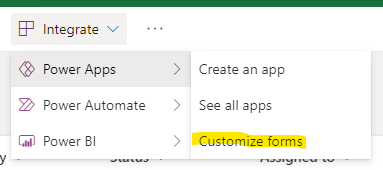
  1. If you haven’t already, create the custom form
  2. Once in Power Apps, add a New screen. “FormScreen1” is the default screen created by the app wizard. If you haven’t added any screens to the app, the new one will be “Screen1”.
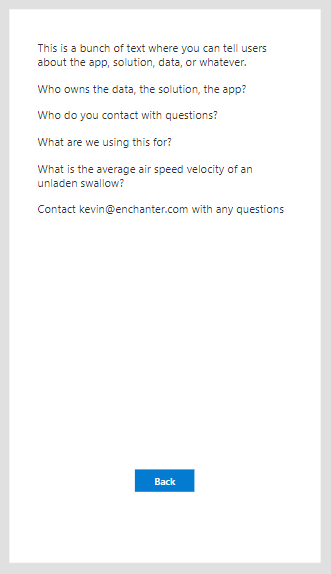
  3. On the new form, add a Text Label (see below for a suggested layout)
    • Add whatever text you’d like to the control. This is the super helpful text for the user to help them be successful using your form.
  4. On the new form, add a Button
    • Set the button Text to “Back” or whatever makes sense for you.
    • For the button OnSelect, set the formula value to “Navigate(FormScreen1)” – back to the original screen.
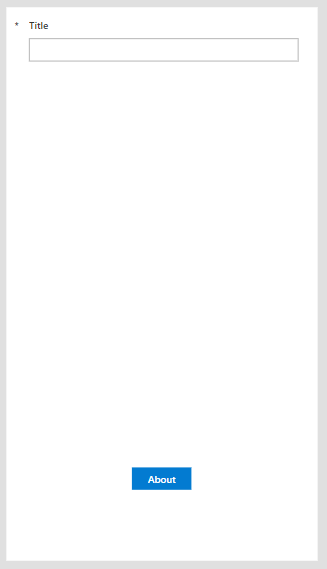
  5. On the original screen, add a Button
    Let your UX guidelines dictate where the button should be located on the screen.
    • For the button OnSelect, set the formula value to “Navigate(Screen1)” – navigate to the new screen.
    • Set the button text to “Info”, “More”, “About”, or whatever makes sense to your users.

Your new (second) screen might look something like this – as an extremely simple example. There’s obviously a LOT more you could do with this. The second screen merely unlocks the possibilities without cluttering up your custom form.

Your first screen might look similar to this, but likely with more fields displayed on the form. The key difference we’re adding here is the button that takes the user to the second screen. Check with your UX folks on how to properly position it.

It might be interesting to consider adding a second screen to the app and having it presented to the user *first* – along the lines of a disclaimer the user must accept before continuing. You’d likely need to tweak the SharePointIntegration control to get that working the way you want it. Just a thought.

Potential Uses

There are lots of potential uses here. Just as many as most other Power Apps as the customized list forms really are fully functional apps. The context, however, being part of a list – will likely drive how additional pages might be used.

  • Content and information sharing (as done here)
    • Who to contact with questions
    • Instructions for the form
  • Visibility to metrics about the list, open items, how fast requests are closed…
  • Additional functionality you don’t want to mix with the main form
  • Visibility to data from another data source
  • … and lots of other things

References

Note: Power Apps Week

So apparently this is Power Apps Week for followers of the Power Hype Machine 😉 as #PowerAddicts get ready for the Power Platform Conference this Fall. I don’t know exactly what that means, but I’m willing to bet David Warner can tell you.

In celebration, I’ll post a few short posts about Power Apps – most, or all, highlighting quick and easy ways to extend M365 capabilities for folks getting their feet wet with Power Apps. Enjoy!